
TCG inventory management is how a game store tracks every trading card it owns as its own item, by printing, finish, condition, language and location, so it knows what it has, where it sits and what is safe to sell right now.
Last updated
What should you record for every card?
One card name is not one item. A single card can be a dozen different things on your shelf, and each one needs its own count. For every copy, record these six things.
- Printing: the set and collector number. Collectors want the exact version, and prices differ between printings.
- Finish: nonfoil, foil or etched. A foil copy is separate stock with its own price.
- Condition: near mint, lightly played, moderately played, heavily played or damaged, each as its own line.
- Language: an English copy and a Japanese copy of the same card are different items.
- Location: the bin, binder or case it lives in, so staff can walk straight to it.
- Quantity: how many are on hand, and how many of those are held for someone.
How do you price singles?
Keep two numbers apart. A market price is a daily estimate of what a card sells for, and it moves. Your own price is the number you put on the card. In Oskii the market figure is always labelled an estimate, and the price a shop sets is labelled Shop price.
Market data in Oskii comes from Scryfall, and foil and etched printings are priced as the separate stock they are. The register still sets the price a customer pays.
What is the difference between on hand, held and available?
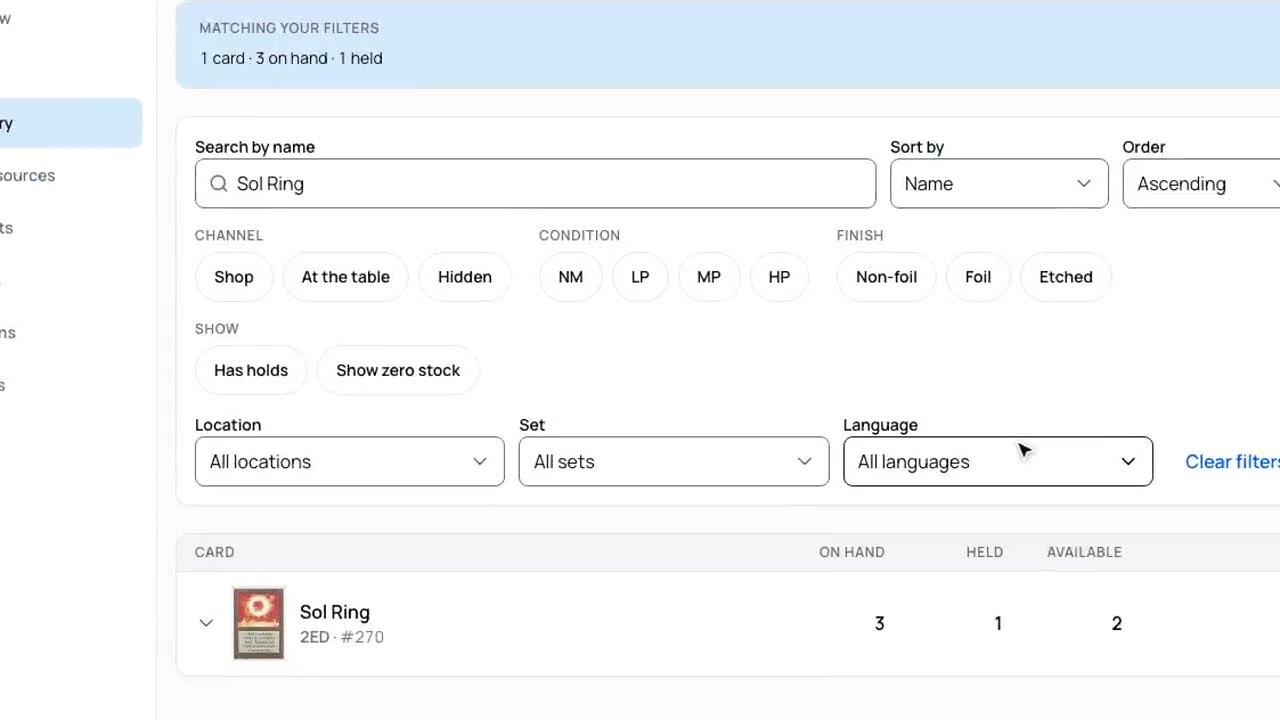
Three numbers do the work. On hand is every copy physically in the shop. Held is every copy already promised to a customer who has not picked it up. Available is on hand minus held.
Available is the only number safe to tell a customer. Work it out every time anyone looks, and never store it: a stored number drifts the moment something changes somewhere else. If a card has three on hand and two held, one is available, and the kiosk should say one.
A single quantity number cannot tell you whether the copy in the case is also in someone's request. That is how two people end up promised the same card.
Read the transcript
Say you have three copies of this card. A customer finds that exact printing on the kiosk and asks you to pull one. Oskii sets it aside so you can't sell it twice. Two left to sell. Maybe build a deck and pull up a chair yourself? Better game stores, better game nights.
Where should stock live, and how does it come in and go out?
Give every copy a named home: a bin, a binder, a case or a back-room box. Keep the scheme boring, such as game, then set, then alphabetical, so a new hire can read a label and know what is inside.
Stock should arrive in a few ways you can trace: you log a delivery, you import a file, or you correct a count. Each way should leave a record, so a mistake can be found and undone.
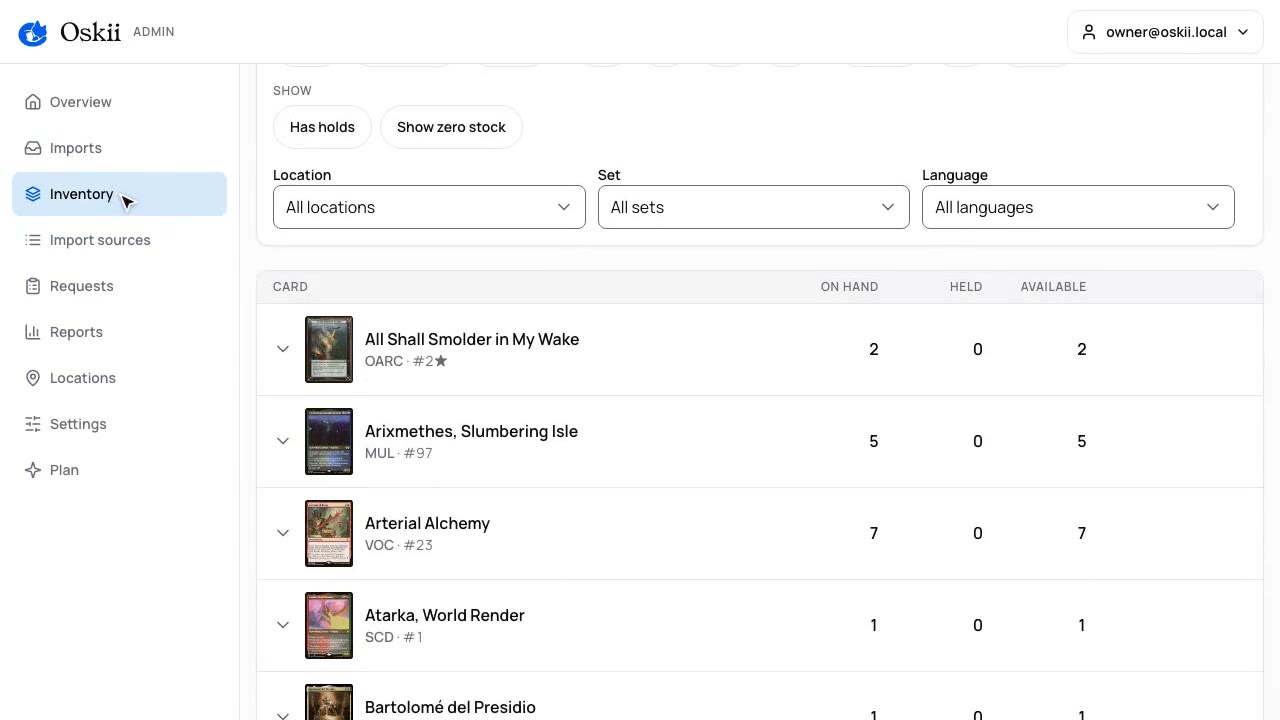
Imports are how most shops start. In Oskii you export a binder from ManaBox, or use a CSV file, and upload it. Oskii compares the file with the stock it already holds and shows a dry run before anything changes, and a card held for a customer is never dropped. An import is a snapshot, not a live connection, so run it again when your source changes.
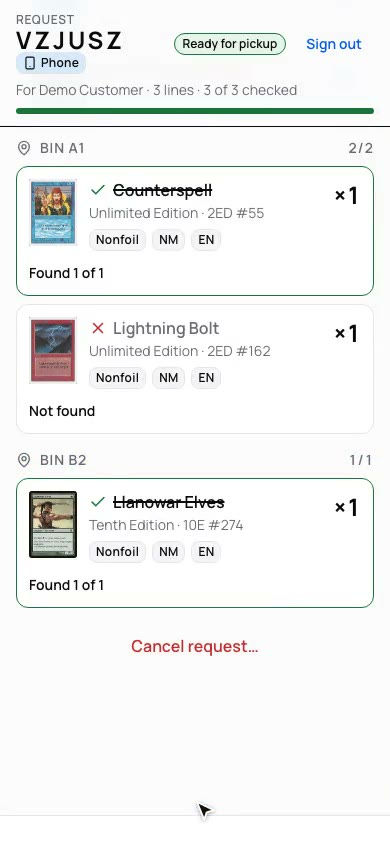
Going out works the same way. A pickup request holds the exact copy, staff work from a pick list with the bin on every line, and each line is marked found or not found. A line that was not found goes back to the shelf.
Read the transcript
Here's a ManaBox export for a commander binder. Choose where the cards go, then press Preview import. Nothing changes until you press Apply import, then check Inventory. I love when operations become simple.
Read the transcript
Let's help fulfill an order. Staff open the request on their phone and press Start fetching. Every line shows the bin. Press Found or Not found. When every line's marked, press Complete request. Moving product just got easier!
How do you stop selling the same card twice?
Place a hold on the exact copy the moment a customer asks for it, and let availability follow from on hand minus held. Two customers can reach for the last copy, but only one hold can be placed on it.
Holds also need an end. If nobody collects a ready request in time, the cards should go back on the shelf by themselves, so stock does not stay locked behind a customer who never came.
Oskii takes no payment for a hold. Nothing is charged until the customer pays at your counter.
Spreadsheet or store software: how do you choose?
Match the tool to how many people touch stock and whether customers search it. A spreadsheet suits one person at one counter. It strains when a second person edits it, when stock sells in two places, or when a customer wants to search what you have.
The options below are real products, described only from what each one says on its own page, read on October 19, 2026. Prices and features change, so each row links to the page it was read from.
| Option | What its own page says it is | Price shown on that page | Status or limits shown there |
|---|---|---|---|
| Spreadsheet | A file you keep up to date by hand | No software cost, but your time | Holds and availability are up to you |
| BinderPOS | Point-of-sale and inventory management software designed for collectibles, cloud-based, with a CSV importer | Binder $100 per month, Binder Pro $150 per month, plus a 2% commission on online sales through your website and 2.5% on sales through the TCGplayer integration (USA only) | Says the Binder plan's features require an active Shopify account, and that it is currently pausing new seller onboarding and sign-ups |
| TCGplayer Pro | Tools to digitize your inventory and manage pricing: Quicklist, Scan & Identify, MassPrice, an in-store kiosk, a website and channel management | Not shown in the page text we read | A page FAQ asks what in-store transactions cost, and its answers were collapsed when we read it |
| CrystalCommerce | An e-commerce platform for game and hobby retailers: a web store, inventory management and a point of sale for in-store and event sales | Not shown on the page we read | Lists sales channels including eBay, Amazon, TCGplayer, CardTrader and Mana Pool |
| TCG Sync | Card shop POS and trading card commerce | Enterprise from $2,499 per month, with no setup fee and no sales percentage | Enterprise is labelled its flagship package; only that price is quoted here |
| Oskii | TCG inventory software for local game stores that sell Magic singles: a kiosk, holds, a pick list and ManaBox and CSV imports | See Oskii's pricing | Not a point of sale and takes no payments. Magic only today. Stores join by invitation from a waitlist |
Which one should you pick?
It depends on the job. If you need a point of sale, a web store or marketplace listings in the same product, some of the platforms above do more than Oskii does, and Oskii is not the right pick. If your problem is that the count disagrees between the shelf, the sheet and the order, and customers want to search and ask for exact copies, one count that every job reads is the fix. That is what Oskii is for.
A weekly inventory checklist
Ten minutes a week keeps the count close to the shelf.
- Count one bin, binder or case and fix every difference you find.
- Check the requests that expired and make sure the cards are back on the shelf.
- Read the not-found lines from the week and recount those cards first.
- Look at what sold and what sat, then restock or reprice from your own sales.
- Check that new arrivals have a printing, finish, condition, language and location.
- Run any import again if its source changed.
Questions shop owners ask
- What is TCG inventory management?
- It is how a game store tracks every trading card it owns as its own item, by printing, finish, condition, language and location, so it knows what it has, where it sits and what is safe to sell.
- What is the difference between on-hand and available stock?
- On hand is every copy physically in the shop. Available is on hand minus anything held for a customer. Customer-facing screens should always show available.
- How do game stores keep track of singles?
- They give every copy a record and a home. Each record carries the printing, finish, condition, language and a bin or binder. Stock comes in through logged deliveries, file imports or corrected counts, and a small weekly count catches drift before it grows.
- How do you stop selling a card that is already reserved?
- Place a hold on the exact copy when a customer asks for it, and work out availability as on hand minus held every time anyone looks. Holds should also expire, so unclaimed copies go back on the shelf.
- Can I import my store's inventory from ManaBox or a CSV file?
- Yes. A store can upload a ManaBox binder export or a CSV file. Oskii compares it with the stock it already holds and shows a dry run before anything changes, and a held card is never dropped.
- Is a spreadsheet enough for a game store?
- For one person at one counter, yes. It starts to strain when a second person edits it, when stock sells in two places, or when customers want to search what you have.